
Word Search Generator: Create Custom Word Search Puzzles Online
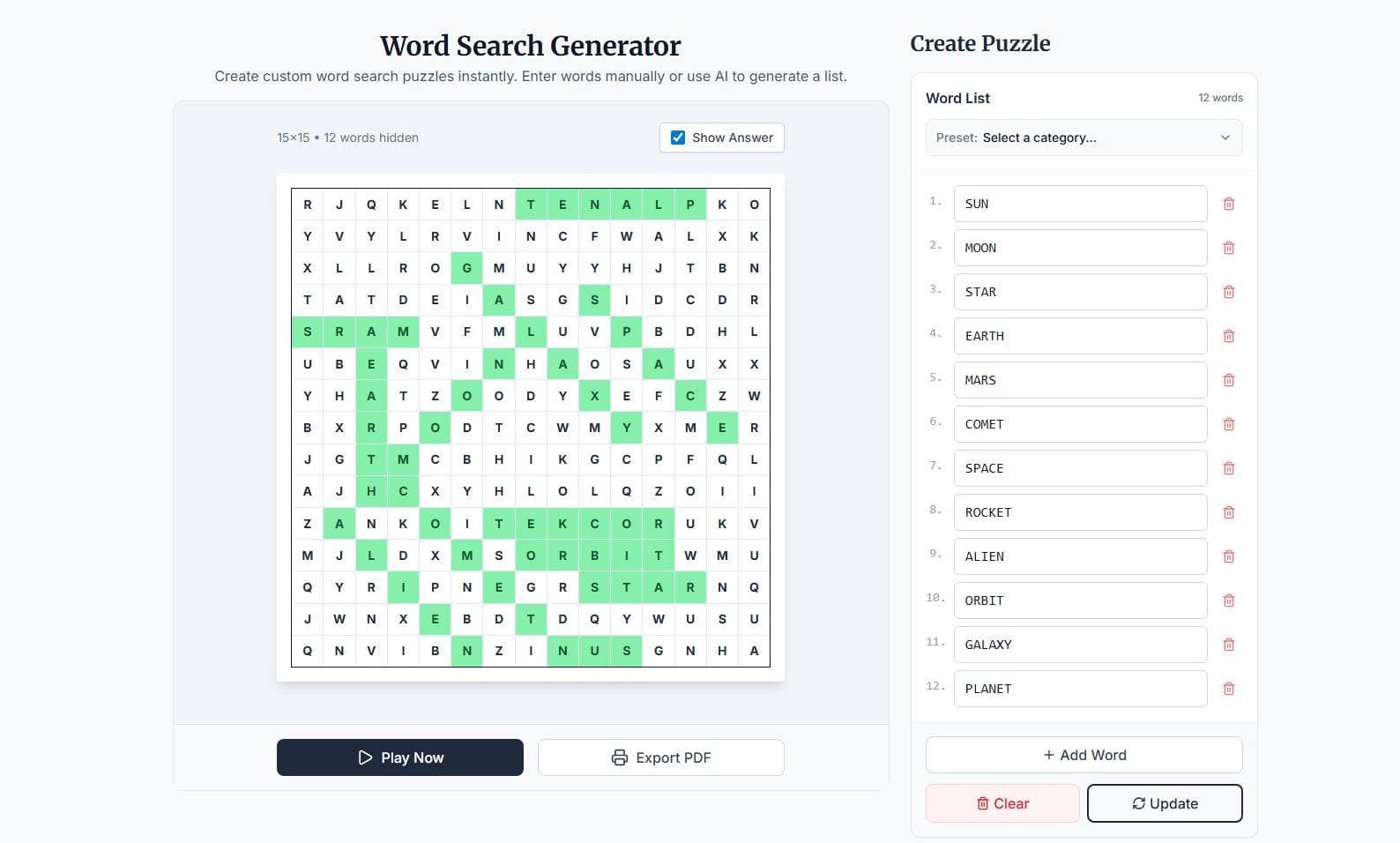
Word search puzzles are one of the most popular educational and recreational word games. They are simple to understand, easy to print, and useful for vocabulary practice, classroom activities, brain training, and casual entertainment. Traditionally, creating a word search puzzle by hand could take a long time, especially when arranging words neatly inside a grid.
A word search generator solves this problem by automatically building puzzles from a custom list of words. Instead of manually placing letters into a grid, users simply enter words, choose settings, and generate a puzzle instantly.
Try it now for free:
What Is a Word Search Generator?
Word Search Generator is a free online tool that allows users to create custom word search puzzles directly in their browser. It is designed for teachers, parents, students, puzzle creators, homeschooling activities, and anyone who enjoys educational word games.
The tool automatically places words into a puzzle grid and fills empty spaces with random letters to create a complete word search. Users can either create their own word lists or use preset categories such as Animals, Science, Food, Nature, Technology, and more.
The generator also includes an AI-powered feature that can create themed word lists automatically based on a topic and selected difficulty level.
Once generated, puzzles can be
Played interactively online
Printed for classroom or offline use
Exported as PDFs with answer keys included
This combination of online play and printable export makes the tool suitable for both digital learning and traditional paper activities.
Why People Use Word Search Puzzles
Word search games are popular because they combine entertainment with learning. They can help improve vocabulary recognition, spelling familiarity, concentration, and pattern recognition.
Common Uses for Word Search Puzzles
Classroom Activities
Teachers often use word searches to reinforce vocabulary lessons, spelling lists, historical terms, scientific concepts, or language learning exercises.
Homeschooling Materials
Parents and tutors can create customized educational activities that match specific learning topics or reading levels.
Puzzle Books
Puzzle creators and self-publishers frequently use generated puzzles when creating printable activity books.
Language Learning
Students learning a second language can practice word recognition and spelling through themed puzzles.
Casual Entertainment
Many people simply enjoy solving word searches as a relaxing offline activity.
Main Features of Word Search Generator
Create Custom Word Lists
The most straightforward way to use the tool is to type in your own words and generate a puzzle around them. This works well for school vocabulary lists, holiday games, event-themed activities, company training sessions, and personalized worksheets. As you add words, the tool validates them automatically to make sure they'll fit correctly inside the puzzle grid, so you're not left troubleshooting a broken layout at the end.
Preset Categories
If you'd rather skip the manual setup, the generator comes with preset categories you can use right away. Options include Animals, Nature, Technology, Food, and Science, among others. These give you a ready-made word list so you can jump straight to generating and playing without any additional prep work.
AI Word Generation
One of the more practical features is the AI generator. You type in a topic, choose a difficulty level, and the tool builds a word list for you. So if you want a puzzle around ocean animals, space vocabulary, beginner English words, historical figures, or geography terms, you don't have to brainstorm from scratch. It's particularly helpful when you have a theme in mind but aren't sure where to start.
Interactive Online Gameplay
The puzzles aren't limited to print. You can play directly in your browser using a mouse or touchscreen, with features like letter highlighting, automatic word detection, progress tracking, and completion indicators built in. This makes the tool a practical option for tablets, mobile devices, and interactive classroom use.
PDF Export With Answer Key
When you're ready to print, you can export the puzzle as a PDF. The file includes the puzzle grid, the word list, and a separate solution page with the answer key. Teachers, tutors, and puzzle book creators will find this especially useful since everything is formatted and ready to hand out or publish.
Automatic Puzzle Saving
The tool automatically saves your current puzzle in the browser, so if the page refreshes or the browser closes unexpectedly, your work isn't lost. It's a small feature, but a genuinely useful one.
How to Use Word Search Generator
The tool is designed to be simple even for first-time users.
Step 1: Create a Word List
Users can either:
Enter their own words manually
Select a preset category
The generator automatically validates the words before puzzle creation.
Step 2: Generate With AI
If users do not have enough words or want themed suggestions, they can:
Enter a topic
Choose a difficulty level
Generate words automatically
The AI then creates a word list suitable for the selected theme.
Step 3: Play or Print
After the puzzle is generated, users can:
Play interactively online
Export the puzzle as a printable PDF
The PDF version includes both the puzzle and answer key.
How Online Word Search Gameplay Works
Finding Words
Players search for words listed beside the puzzle grid.
Words may appear:
Horizontally
Vertically
Diagonally
In reverse directions
The available directions depend on the selected difficulty level.
Selecting Words
Players select words by:
Clicking or tapping the first letter
Dragging to the final letter
If the selection is correct, the word is highlighted and crossed off the list.
Completing the Puzzle
The puzzle is completed when all hidden words are found.
How Online Word Search Gameplay Works
Finding Words
Players search for words from a list displayed beside the puzzle grid. Depending on the difficulty level you choose, words can appear horizontally, vertically, diagonally, or in reverse directions, so the challenge scales naturally as the directions become less predictable.
Selecting Words
To select a word, click or tap the first letter and drag to the final letter. If the selection is correct, the word gets highlighted and crossed off the list automatically.
Completing the Puzzle
The puzzle is complete once every hidden word has been found.
Who Can Benefit From Word Search Generator?
Teachers can quickly put together vocabulary worksheets for almost any subject, whether that's science terminology, geography, historical events, reading assignments, or foreign language practice. Having a tool that handles the layout and answer key saves real preparation time.
Parents can use it to create educational activities at home, including something to keep kids engaged during travel, holidays, or quiet study time.
Homeschooling families often rely on printable resources, and the ability to build custom puzzles around specific curriculum topics makes this a practical fit for structured home education.
Puzzle book creators and self-publishers can use the generator to populate activity books, educational workbooks, and printable learning materials without building every puzzle by hand.
Students can also use the tool independently, running through themed puzzles as a straightforward way to review vocabulary and reinforce what they've been studying.
Educational Benefits of Word Search Puzzles
Repeated exposure to words helps learners recognize spelling patterns and retain new vocabulary over time. The act of scanning a grid also builds letter recognition and reading skills in a way that feels more active than simply reading a list. Players have to stay focused and examine the grid carefully, which naturally supports concentration. And because it feels like a game rather than a lesson, the low-pressure format tends to make learners more willing to engage.
Themed puzzles add another layer of value, particularly for ESL learners, students building subject-specific vocabulary, and younger children working on early reading skills.
Word Search Generator for Educational Activities
Teachers can weave custom word searches into nearly any classroom subject. A science lesson might call for a puzzle built around biology vocabulary, planet names, or chemical elements. History classes can use them to reinforce knowledge of historical figures, major events, or ancient civilizations. Language arts is a natural fit too, whether for spelling lists, reading vocabulary, or exploring synonyms and antonyms. Geography teachers can build puzzles around countries, capitals, and landforms, giving students a more interactive way to absorb material they'd otherwise just memorize from a textbook.
Advantages of Using an Online Word Search Generator
Building a word search by hand takes time, and the formatting alone can become its own project. An automated generator handles all of that for you. Words are placed automatically, the layout is ready to print, and you don't have to wrestle with spacing or grid sizing. On top of that, the tool works on mobile, supports interactive browser gameplay, and includes AI-assisted word generation for when you need a themed list quickly. Whether you're putting together a one-off classroom activity or building a full puzzle book, those features add up to a meaningful reduction in prep time and effort.
Students can also use the tool independently, running through themed puzzles as a straightforward way to review vocabulary and reinforce what they've been studying.
Why Choose Word Search Generator by ZilTool?
Word Search Generator by Ziltool makes it easy to create custom word search puzzles for classrooms, homeschooling, printable activities, and casual fun. With AI-generated word lists, online gameplay, and printable PDF exports, users can build puzzles quickly without complicated setup.